
Financial tracking for rental property owners
See how each property performs month by month.
Organize rental income, expenses, and overdue bills. Track each property's monthly results in one place.
The challenge
Month-end reporting shouldn't depend on multiple spreadsheets.
When information is scattered, understanding how each property performed requires repetitive manual checks.
- Information spread across different tools.
- Bills that can slip through the cracks.
- Difficulty calculating net results.
- Time-consuming comparisons across properties.
- Monthly reporting completed by hand.
Benefits
The essentials for tracking your portfolio.
Organized financial information to help you understand each property and compare results for the period.
Monthly results by property
Income, expenses, and balance organized by period.
Bills under control
Paid, pending, and overdue items stay visible.
Portfolio comparison
See which properties performed better or worse during the period.
How it works
From setup to monthly review.
A simple routine to keep transactions organized and review the results for each period.
- Step 01
Add your properties.
Keep the properties you track together in one portfolio.
- Step 02
Track income and expenses.
Organize each property's income and bills throughout the month.
- Step 03
Review each month's results.
Review income, expenses, and balance by property and period.
Product demo
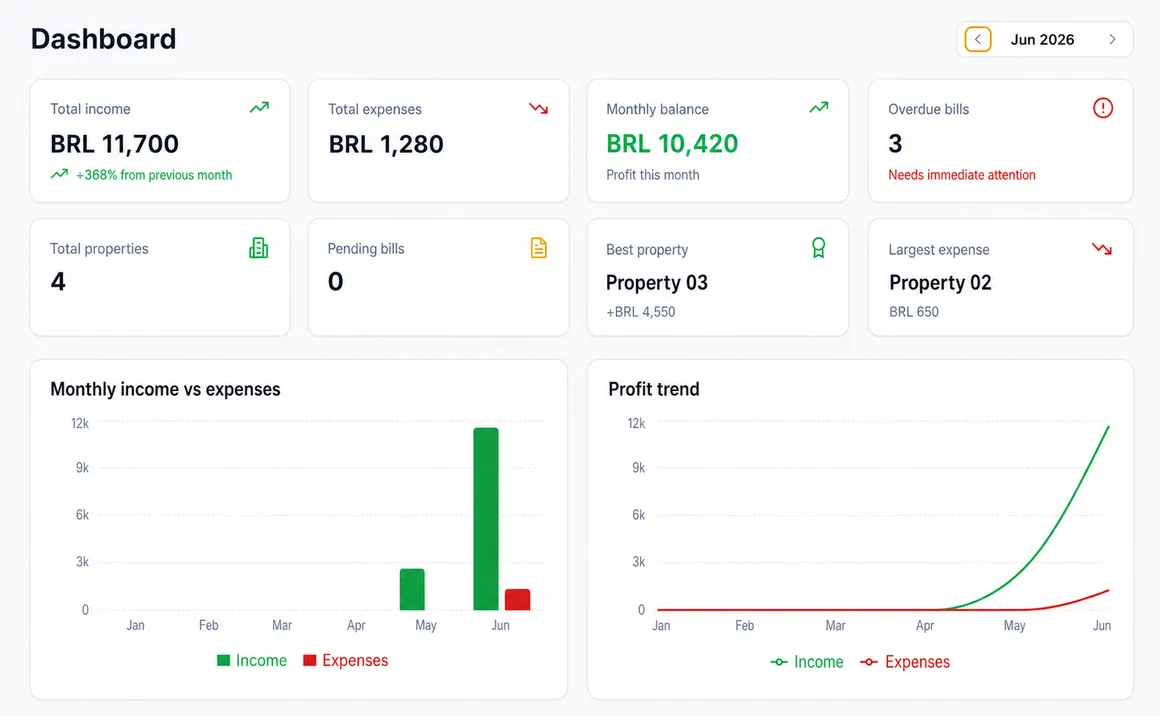
A clear view of your rental portfolio.
Period KPIs, income and expense charts, and a property overview in one dashboard.
Product screenshot · synthetic data
Who it's for
Built for owners who manage their own portfolios.
A centralized financial view for tracking small portfolios without relying on scattered tools.
Rental property owners
For people who track income, expenses, and bills for their own properties.
Small-scale real estate investors
For people who need to compare property results over time.
Anyone moving beyond spreadsheets
Bring your portfolio's financial view together in one dashboard.
Scope limitation:FinnTrack Home is a financial dashboard for small portfolios. It is not a full property management system for large companies.
Frequently asked questions
Common questions, straightforward answers.
See how FinnTrack Home fits the routine of people who manage a small portfolio.
Do I need to install anything?
No. FinnTrack Home works on the web and can be accessed directly from your browser.
Can I track multiple properties?
Yes. An account can currently add up to three properties and track income, expenses, and monthly results by property and period.
What information can I track?
Properties, income, expenses, paid, pending, and overdue bills, monthly results, and portfolio comparisons.
How is my data protected?
The app uses authentication and user-level access rules. No system eliminates all risks; review the Privacy Policy to understand how data is handled.
Does FinnTrack Home replace a property manager or accountant?
No. It organizes and presents your portfolio's financial information; it does not replace accounting, legal, or property management services.
Can I use it on my phone?
Yes. The app works in a browser and adapts to smaller screens.
Start organizing your portfolio
See how each property performs.
Bring income, expenses, and bills together to review each month more clearly.
Create account